Filming With A Green Screen
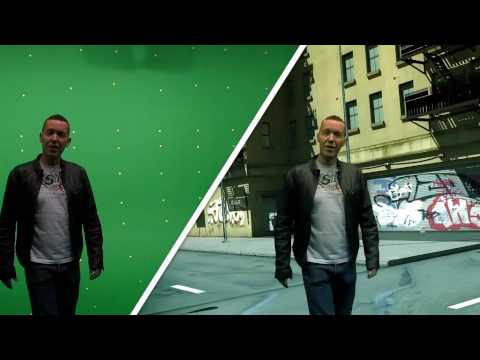
I am planning on using trippy, moving backgrounds of swirling colors, and moving clouds in my video, the easiest way i can do this is by using a green screen. This will be the first time that i will be using a green screen, i used youtube tutorials to lear how to do it First i will find a big flat wall, i will use big rolls of bright green paper to make the green background. Ill need to make sure that the lighting is evenly spread all over the subject and the background, the most effective way of doing this is by using 3 point lighting - This is where you put a light shining on the subject, chest area, then 2 other lights shining either side of the subject to illuminate the whole of the background. You can then film your footage.

It is essential that you get rid of all creases and shadows on the green screen, so that it has maximum effectivity, and looks smooth. You must also make sure that your actor, or subject doesn't have anything green on them, or else it will become part of the background when you edit it. The reason you Use bright green is because its the least common colour that can appear on a person, and it shows up very clearly behind them.
When editing It in Adobe After Effects i will do the following - After dragging the footage into a new composition, then under effects and presets search for key light, and apply it to the footage. I then use the screen colour dropper tool and select the green background. Then change the view from final result to screen matt, change the colour balance so the background is completely black, and the subject is completely white. Then switch back to final result, and the subject has a nice smooth edge all the way around. You can then create a new background layer, and lay any images or video footage over it, and your green screen effect is done.
Last year when i did my As piece, i was more limited with what i could do, because i had just got some new video editing software, now i have had a while to get used to it, so i can do better special effects. Also i could never use a green screen, because i had no idea how to key it in, so my skills have developed massively this year, and i can do alot more than ever before. Also with sound editing softwares, this has been a drastic improvement. Last year i could only use Adobe Audition, which is a very basic sound editing software. Now i know how to use FL Studio, which is a proper DAW (Digital Audio Workstation), so i can make better quality tracks.


